Installation
Minimum System Requirements
Kronos has been tested on Ubuntu 16.04.5 LTS. It uses a modified linux kernel v4.4.50. The system should consist of an Intel i5 or later processor with atleast 4 cores and 8 GB of RAM for good performance. It is preferable to install Kronos inside a VM with Virtualized Intel-VTx and CPU performance counters. This is known to avoid display driver issues on newer laptops/machines.
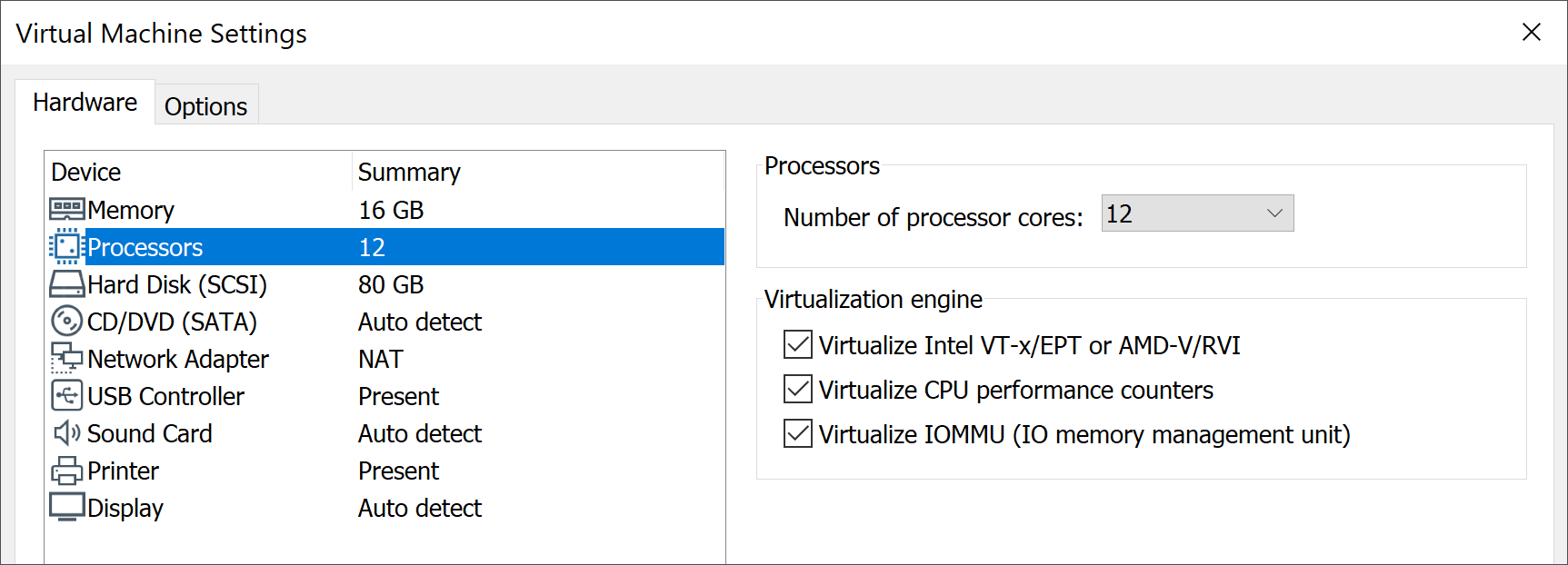
Virtualization Settings required for virtual machine in VMware.
Python version 3.6 or higher should be the default on your system.
Installing Kronos
To get started on Kronos, please perform the following setup steps:
Disable Transparent HugePages: (Add the following to /etc/rc.local to permanently disable them):
if test -f /sys/kernel/mm/transparent_hugepage/enabled; then
  echo never > /sys/kernel/mm/transparent_hugepage/enabled
fi
if test -f /sys/kernel/mm/transparent_hugepage/defrag; then
  echo never > /sys/kernel/mm/transparent_hugepage/defrag
fi
Ensure that /etc/rc.local has execute permissions:
sudo chmod +x /etc/rc.local
Clone Repository into /home/${user} directory. Checkout the master branch:
git clone https://github.com/Vignesh2208/Kronos.git
Compile and configure Kronos kernel patch:
cd ~/Kronos
sudo make setup_kernel
Note
Over the course of kernel setup, a menu config would appear.
The following additional config steps should also be performed inside menuconfig:
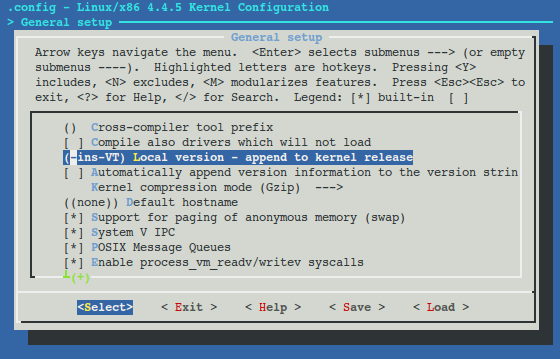
- Under General setup
–> Append a local kernel version name. (e.g it could be “-ins-VT”)
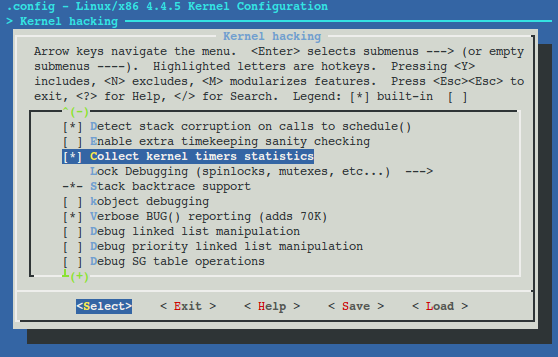
- Under kernel_hacking
–> enable Collect kernel timers statistics
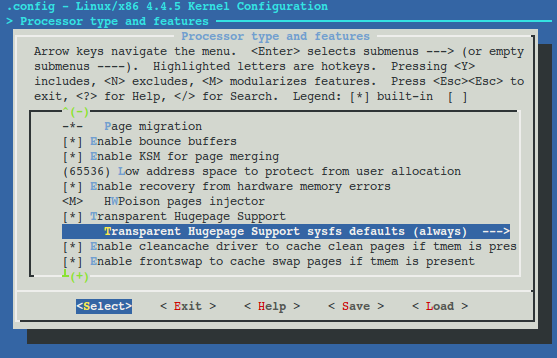
- Under Processor types and features
- –> Transparent Huge Page support
–> Transparent Huge Page support sysfs defaults should be set to always
Reboot the machine and into the new kernel (identifiable by the appended local kernel version name in the previous step)
Build and load Kronos module:
cd ~/Kronos
sudo make build load
Ready to use VM
Link to a ready to use Kronos VM will be provided upon request. Please contact projectmoses@illinois.edu.
Verifying Installation
The following tests (optional) can be run to verify the Kronos installation:
INS-SCHED specific test:
cd ~/Kronos/src/tracer/tests
sudo make run_repeatability_test
Kronos integration tests:
cd ~/Kronos/test
sudo make run
All of the above tests should print a SUCCESS message.
Loading Kronos after each reboot
Inorder to use Kronos, it must be loaded after each VM/machine reboot. It can be loaded with the following command:
cd ~/Kronos
sudo make load
Patching Kronos kernel after an update
If a previously installed Kronos kernel needs to be updated with new changes in the git repo:
cd ~/Kronos && git pull origin master
sudo make patch_kernel # Follow same installation steps when prompted in menuconfig